ISSUE-014
上层View导致按键映射失灵
常见表现
同时按下WASD和鼠标后(触发多点触控),按键映射失灵。
相关源码
UIKitCore.framework
void -[UIResponder touchesBegan:withEvent:] {
	forwardTouchMethod(self, SEL, touches, event, 0LL);
}

void forwardTouchMethod(UIResponder *responder, SEL selector, NSSet *touches, UIEvent *event, int flag) {
	UIResponder *nextResponder = responder.nextResponder;
	NSMutableSet *newTouches = [[NSMutableSet alloc] init];
	for (UITouch *touch in touches) {
		if (UIResponderForwarderWantsForwardingFromResponder(touch, selector, responder, nextResponder, event)) {
			[newTouches addObject: touch];
		}
	}
	if (newTouches.count > 0) {
		[nextResponder performSelector:selector with: newTouches, event];
	}
}

BOOL UIResponderForwarderWantsForwardingFromResponder(UITouch *touch, SEL selector, UIResponder *curResponder, UIResponder *nextResponder, UITouchesEvent *event) {
	// ...
	NSSet *touches = [event touchesForWindow:touch.window];
	if (touches.count > 1) {
		return NO;
	}
	// ...
}
PlayTools PTFakeMetaTouch.m
void eventSendCallback() {
    UIEvent *event = [[UIApplication sharedApplication] _touchesEvent];
    [event _clearTouches];

    [livingTouchAry enumerateObjectsUsingBlock:^(UITouch *aTouch, NSUInteger idx, BOOL *stop) {
        [event _addTouch:aTouch forDelayedDelivery:NO];
    }];

    [[UIApplication sharedApplication] sendEvent:event];
}
原因分析
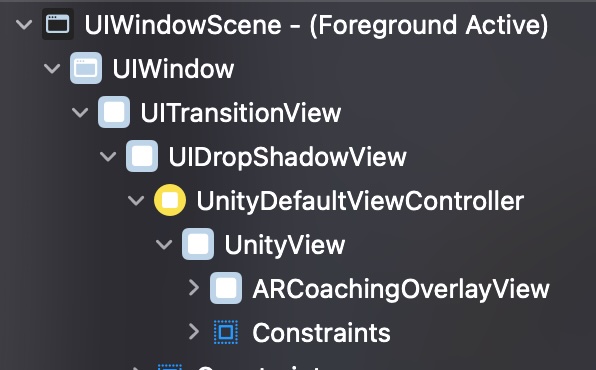
Root View(UnityView)的上层存在另一个View(ARCoachingOverlayView),同时上层View的isUserInteractionEnabled属性为true,但没有重写touchesBegan:withEvent:。
PlayCover的按键映射代码,将多个UITouch放入一个UIEvent中,然后通过[UIApplication sendEvent:]发送事件。
首先上层View(ARCoachingOverlayView)接收到此事件,但因为其本身没有重写touchesBegan:withEvent:,所以交由基类UIResponder的touchesBegan:withEvent:来处理。
正常来说,UIResponder会将事件转发给下一个UIResponder(即UnityView)。
但UIResponderForwarderWantsForwardingFromResponder函数发现UIEvent包含多个UITouch,拒绝转发。
解决方法
方法一:阻止创建上层View。
方法二:将上层View的isUserInteractionEnabled属性改为false。
方法三(临时):修改PlayCover代码,确保UIEvent只包含一个UITouch。
PlayTools PTFakeMetaTouch.m
void eventSendCallback() {
    UIEvent *event = [[UIApplication sharedApplication] _touchesEvent];

    [livingTouchAry enumerateObjectsUsingBlock:^(UITouch *aTouch, NSUInteger idx, BOOL *stop) {
	    [event _clearTouches];
        [event _addTouch:aTouch forDelayedDelivery:NO];
	    [[UIApplication sharedApplication] sendEvent:event];
    }];
}